1614 lines
74 KiB
Markdown
1614 lines
74 KiB
Markdown

|
# SunEditor
|
||
|
|
Vanilla javascript based WYSIWYG web editor, with no dependencies.
|
||
|
|
SunEditor supports IE11 and all modern browsers with no dependencies and polyfill.
|
||
|
|
Coded based on ES5 in supported by IE11.
|
||
|
|
|
||
|
|
#### Demo : <a href="http://suneditor.com" target="_blank">suneditor.com</a>
|
||
|
|
|
||
|
|
[](https://github.com/JiHong88/SunEditor/blob/master/LICENSE.txt)
|
||
|
|
[](https://github.com/JiHong88/SunEditor/releases)
|
||
|
|
[](https://www.npmjs.com/package/suneditor)
|
||
|
|
[](https://github.com/JiHong88/SunEditor/releases/latest)
|
||
|
|
[](https://www.jsdelivr.com/package/npm/suneditor)
|
||
|
|
[](https://www.npmjs.com/package/suneditor)
|
||
|
|

|
||
|
|
|
||
|
|
> The Suneditor is a lightweight, flexible, customizable WYSIWYG text editor for your web applications.
|
||
|
|
> - Pasting from Microsoft Word and Excel.
|
||
|
|
> - Custom table selection, merge and split.
|
||
|
|
> - Media embed, images upload.
|
||
|
|
> - Can use CodeMirror, KaTeX.
|
||
|
|
> - And.. many other features :)
|
||
|
|
|
||
|
|
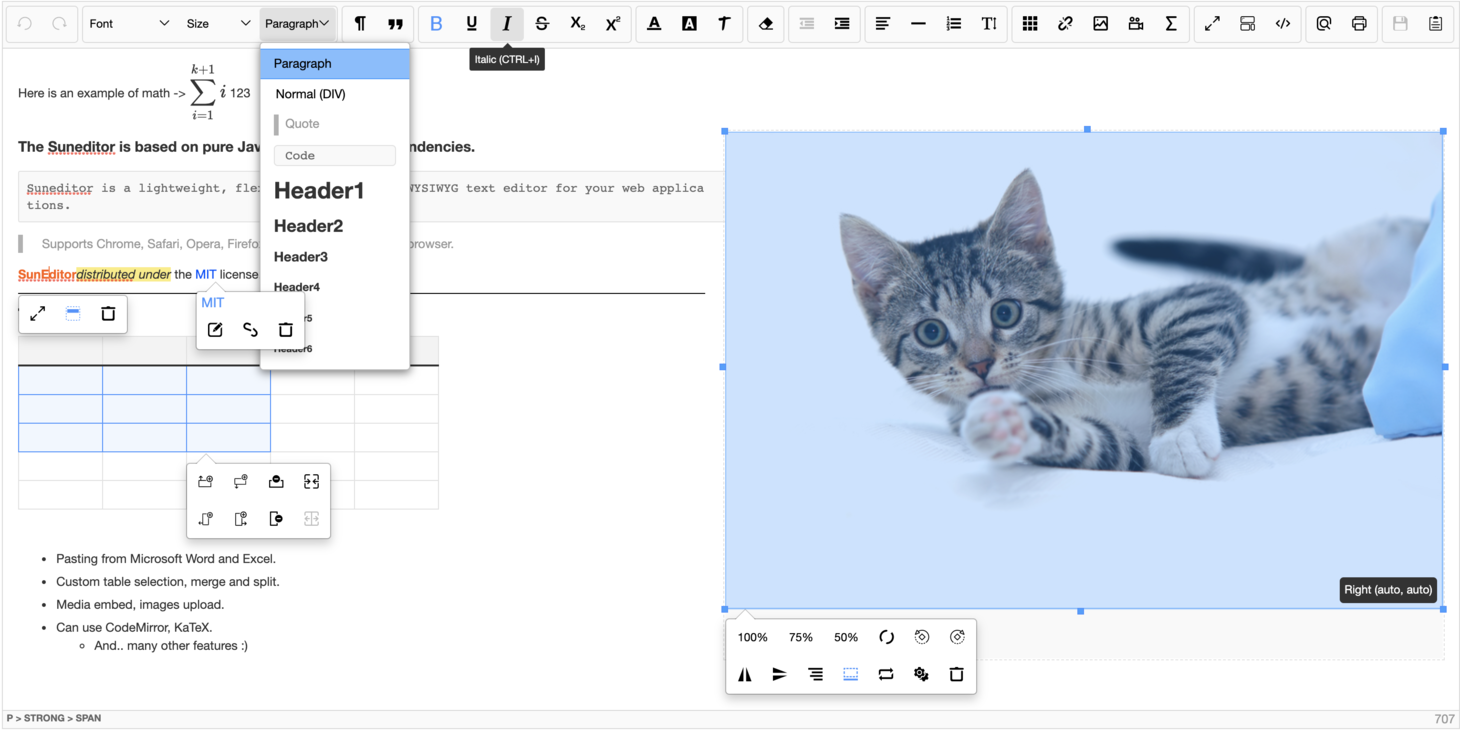
|
||
|
|
|
||
|
|
## Table of contents
|
||
|
|
- [Browser Support](#browser-support)
|
||
|
|
- [Install](#install)
|
||
|
|
- [Getting Started](#getting-started)
|
||
|
|
- [When inserting custom tags in the editor](#when-inserting-custom-tags-in-the-editor)
|
||
|
|
- [Use import statement](#use-import-statement)
|
||
|
|
- [Load only what you want](#1-load-only-what-you-want)
|
||
|
|
- [Load all plugins](#2-load-all-plugins)
|
||
|
|
- [Plugins can be used directly in the button list](#3-plugins-can-be-used-directly-in-the-button-list)
|
||
|
|
- [Init function](#init-function)
|
||
|
|
- [Use CodeMirror](#use-codemirror)
|
||
|
|
- [Use KaTeX (math plugin)](#use-katex-math-plugin)
|
||
|
|
- [Options](#options)
|
||
|
|
- [Functions](#functions)
|
||
|
|
- [Plugins list](#plugins-list)
|
||
|
|
- [Examples](#examples)
|
||
|
|
- [Options template](#options-template)
|
||
|
|
- [Custom plugins](#custom-plugins)
|
||
|
|
- [Document](#document)
|
||
|
|
- [Other libraries using SunEditor](#other-libraries-using-sunEditor)
|
||
|
|
- [suneditor-react](#lib-suneditor-react)
|
||
|
|
- [angular-suneditor](#lib-angular-suneditor)
|
||
|
|
- [Using SunEditor with Livewire & Alpine.JS](#lib-livewire-alpine)
|
||
|
|
- [Plugin for Pluxml](#lib-pluxml)
|
||
|
|
- [AEM-SunEditor](#lib-aem-suneditor)
|
||
|
|
- [License](#license)
|
||
|
|
|
||
|
|
|
||
|
|
#### Browser Support
|
||
|
|
|
||
|
|
| <img src="http://suneditor.com/docs/chrome-64.png" alt="Chrome" width="16px" height="16px" /> Chrome | <img src="http://suneditor.com/docs/mozilla-64.png" alt="Firefox" width="16px" height="16px" /> Firefox | <img src="http://suneditor.com/docs/opera-64.png" alt="Opera" width="16px" height="16px" /> Opera | <img src="http://suneditor.com/docs/safari-64.png" alt="Safari" width="16px" height="16px" /> Safari | <img src="http://suneditor.com/docs/edge-64.png" alt="Edge" width="16px" height="16px" /> Edge | <img src="http://suneditor.com/docs/explorer-64.png" alt="Explorer" width="16px" height="16px" /> Internet Explorer |
|
||
|
|
|:---:|:---:|:---:|:---:|:---:|:---:|
|
||
|
|
| Yes | Yes | Yes | Yes | Yes | 11+ |
|
||
|
|
|
||
|
|
## Install
|
||
|
|
#### Npm
|
||
|
|
``` sh
|
||
|
|
$ npm install suneditor --save
|
||
|
|
```
|
||
|
|
#### Bower
|
||
|
|
``` sh
|
||
|
|
$ bower install suneditor --save
|
||
|
|
```
|
||
|
|
#### CDN
|
||
|
|
``` html
|
||
|
|
<link href="https://cdn.jsdelivr.net/npm/suneditor@latest/dist/css/suneditor.min.css" rel="stylesheet">
|
||
|
|
<!-- <link href="https://cdn.jsdelivr.net/npm/suneditor@latest/assets/css/suneditor.css" rel="stylesheet"> -->
|
||
|
|
<!-- <link href="https://cdn.jsdelivr.net/npm/suneditor@latest/assets/css/suneditor-contents.css" rel="stylesheet"> -->
|
||
|
|
<script src="https://cdn.jsdelivr.net/npm/suneditor@latest/dist/suneditor.min.js"></script>
|
||
|
|
<!-- languages (Basic Language: English/en) -->
|
||
|
|
<script src="https://cdn.jsdelivr.net/npm/suneditor@latest/src/lang/ko.js"></script>
|
||
|
|
```
|
||
|
|
[jsdelivr/suneditor](https://www.jsdelivr.com/package/npm/suneditor)
|
||
|
|
|
||
|
|
## Getting Started
|
||
|
|
### 1. Target Element
|
||
|
|
```html
|
||
|
|
<textarea id="sample">Hi</textarea>
|
||
|
|
```
|
||
|
|
|
||
|
|
### 2. Create
|
||
|
|
```javascript
|
||
|
|
/**
|
||
|
|
* ID : 'suneditor_sample'
|
||
|
|
* ClassName : 'sun-eidtor'
|
||
|
|
*/
|
||
|
|
// ID or DOM object
|
||
|
|
const editor = SUNEDITOR.create((document.getElementById('sample') || 'sample'),{
|
||
|
|
// All of the plugins are loaded in the "window.SUNEDITOR" object in dist/suneditor.min.js file
|
||
|
|
// Insert options
|
||
|
|
// Language global object (default: en)
|
||
|
|
lang: SUNEDITOR_LANG['ko']
|
||
|
|
});
|
||
|
|
```
|
||
|
|
|
||
|
|
### 3. Contents display
|
||
|
|
```java
|
||
|
|
When you display a document created by suneditor
|
||
|
|
You need to include "src/assets/css/suneditor-contents.css" or "dist/css/suneditor.min.css" file.
|
||
|
|
Then add "sun-editor-editable" to the class name of the Tag element that displays the content.
|
||
|
|
If you are using RTL mode, you also need to add "se-rtl".
|
||
|
|
In "suneditor-contents.css", you can define the style of all the tags created in suneditor.
|
||
|
|
```
|
||
|
|
|
||
|
|
## When inserting custom tags in the editor
|
||
|
|
```text
|
||
|
|
- Empty tags without meaning or tags that do not fit the editor's format are modified or deleted.
|
||
|
|
Tags with the class name "se-component" or "__se__tag" of the top-level tag will not be deleted.
|
||
|
|
"se-component" is the component type of the editor.
|
||
|
|
Class name for wrapper tags such as images and videos.
|
||
|
|
```
|
||
|
|
|
||
|
|
## Use import statement
|
||
|
|
|
||
|
|
### 1. Load only what you want
|
||
|
|
```javascript
|
||
|
|
import 'suneditor/dist/css/suneditor.min.css'
|
||
|
|
// import 'suneditor/assets/css/suneditor.css'
|
||
|
|
// import 'suneditor/assets/css/suneditor-contents.css'
|
||
|
|
import suneditor from 'suneditor'
|
||
|
|
|
||
|
|
// How to import plugins
|
||
|
|
import image from 'suneditor/src/plugins/dialog/link'
|
||
|
|
import list from 'suneditor/src/plugins/submenu/list'
|
||
|
|
import {font, video} from 'suneditor/src/plugins'
|
||
|
|
|
||
|
|
// How to import language files (default: en)
|
||
|
|
import lang from 'suneditor/src/lang'
|
||
|
|
import {ko} from 'suneditor/src/lang'
|
||
|
|
import de from 'suneditor/src/lang/de'
|
||
|
|
|
||
|
|
suneditor.create('sample', {
|
||
|
|
plugins: [font, video, image, list],
|
||
|
|
buttonList: [
|
||
|
|
['font', 'video', 'image', 'list']
|
||
|
|
],
|
||
|
|
lang: lang.ko
|
||
|
|
});
|
||
|
|
```
|
||
|
|
|
||
|
|
### 2. Load all plugins
|
||
|
|
```javascript
|
||
|
|
import 'suneditor/dist/css/suneditor.min.css'
|
||
|
|
import suneditor from 'suneditor'
|
||
|
|
import plugins from 'suneditor/src/plugins'
|
||
|
|
|
||
|
|
suneditor.create('sample', {
|
||
|
|
plugins: plugins,
|
||
|
|
buttonList: [
|
||
|
|
['undo', 'redo'],
|
||
|
|
['font', 'fontSize', 'formatBlock'],
|
||
|
|
['paragraphStyle', 'blockquote'],
|
||
|
|
['bold', 'underline', 'italic', 'strike', 'subscript', 'superscript'],
|
||
|
|
['fontColor', 'hiliteColor', 'textStyle'],
|
||
|
|
['removeFormat'],
|
||
|
|
'/', // Line break
|
||
|
|
['outdent', 'indent'],
|
||
|
|
['align', 'horizontalRule', 'list', 'lineHeight'],
|
||
|
|
['table', 'link', 'image', 'video', 'audio' /** ,'math' */], // You must add the 'katex' library at options to use the 'math' plugin.
|
||
|
|
/** ['imageGallery'] */ // You must add the "imageGalleryUrl".
|
||
|
|
['fullScreen', 'showBlocks', 'codeView'],
|
||
|
|
['preview', 'print'],
|
||
|
|
['save', 'template'],
|
||
|
|
/** ['dir', 'dir_ltr', 'dir_rtl'] */ // "dir": Toggle text direction, "dir_ltr": Right to Left, "dir_rtl": Left to Right
|
||
|
|
]
|
||
|
|
})
|
||
|
|
|
||
|
|
// You can also load what you want
|
||
|
|
suneditor.create('sample', {
|
||
|
|
plugins: [plugins.font],
|
||
|
|
// Plugins can be used directly in the button list
|
||
|
|
buttonList: [
|
||
|
|
['font', plugins.image]
|
||
|
|
]
|
||
|
|
})
|
||
|
|
```
|
||
|
|
|
||
|
|
### 3. Plugins can be used directly in the button list
|
||
|
|
```javascript
|
||
|
|
import 'suneditor/dist/css/suneditor.min.css'
|
||
|
|
import suneditor from 'suneditor'
|
||
|
|
import {align, font, fontSize, fontColor, hiliteColor,
|
||
|
|
horizontalRule, image, template} from 'suneditor/src/plugins'
|
||
|
|
|
||
|
|
suneditor.create('sample', {
|
||
|
|
buttonList: [
|
||
|
|
['undo', 'redo', 'removeFormat'],
|
||
|
|
[align, font, fontSize, fontColor, hiliteColor],
|
||
|
|
[horizontalRule, image, template]
|
||
|
|
],
|
||
|
|
})
|
||
|
|
```
|
||
|
|
|
||
|
|
## Init function
|
||
|
|
```text
|
||
|
|
The init function can be used by predefining options and calling the create function on the returned object.
|
||
|
|
The value of the option argument put in the "create" function call takes precedence
|
||
|
|
```
|
||
|
|
```javascript
|
||
|
|
import 'suneditor/dist/css/suneditor.min.css'
|
||
|
|
import suneditor from 'suneditor'
|
||
|
|
import plugins from 'suneditor/src/plugins'
|
||
|
|
|
||
|
|
// all plugins
|
||
|
|
const initEditor = suneditor.init({
|
||
|
|
plugins: plugins,
|
||
|
|
height: 200,
|
||
|
|
buttonList: [
|
||
|
|
[
|
||
|
|
'undo', 'redo',
|
||
|
|
'font', 'fontSize', 'formatBlock',
|
||
|
|
'paragraphStyle', 'blockquote',
|
||
|
|
'bold', 'underline', 'italic', 'strike', 'subscript', 'superscript',
|
||
|
|
'fontColor', 'hiliteColor', 'textStyle',
|
||
|
|
'removeFormat',
|
||
|
|
'outdent', 'indent',
|
||
|
|
'align', 'horizontalRule', 'list', 'lineHeight',
|
||
|
|
'table', 'link', 'image', 'video', 'audio', /** 'math', */ // You must add the 'katex' library at options to use the 'math' plugin.
|
||
|
|
/** 'imageGallery', */ // You must add the "imageGalleryUrl".
|
||
|
|
'fullScreen', 'showBlocks', 'codeView',
|
||
|
|
'preview', 'print', 'save', 'template',
|
||
|
|
/** 'dir', 'dir_ltr', 'dir_rtl' */ // "dir": Toggle text direction, "dir_ltr": Right to Left, "dir_rtl": Left to Right
|
||
|
|
]
|
||
|
|
]
|
||
|
|
});
|
||
|
|
|
||
|
|
initEditor.create('sample_1', {
|
||
|
|
// The value of the option argument put in the "create" function call takes precedence
|
||
|
|
});
|
||
|
|
|
||
|
|
initEditor.create('sample_2', {
|
||
|
|
// The value of the option argument put in the "create" function call takes precedence
|
||
|
|
height: 'auto',
|
||
|
|
buttonList: [
|
||
|
|
['bold', 'underline', 'italic'],
|
||
|
|
['removeFormat'],
|
||
|
|
['preview', 'print']
|
||
|
|
]
|
||
|
|
});
|
||
|
|
```
|
||
|
|
|
||
|
|
## Use CodeMirror
|
||
|
|
```html
|
||
|
|
<!-- https://github.com/codemirror/CodeMirror -->
|
||
|
|
<!-- codeMirror (^5.0.0) -->
|
||
|
|
<!-- Use version 5.x.x -->
|
||
|
|
<link rel="stylesheet" href="https://cdn.jsdelivr.net/npm/codemirror@5.49.0/lib/codemirror.min.css">
|
||
|
|
<script src="https://cdn.jsdelivr.net/npm/codemirror@5.49.0/lib/codemirror.min.js"></script>
|
||
|
|
<script src="https://cdn.jsdelivr.net/npm/codemirror@5.49.0/mode/htmlmixed/htmlmixed.js"></script>
|
||
|
|
<script src="https://cdn.jsdelivr.net/npm/codemirror@5.49.0/mode/xml/xml.js"></script>
|
||
|
|
<script src="https://cdn.jsdelivr.net/npm/codemirror@5.49.0/mode/css/css.js"></script>
|
||
|
|
```
|
||
|
|
```javascript
|
||
|
|
import 'suneditor/dist/css/suneditor.min.css'
|
||
|
|
import suneditor from 'suneditor'
|
||
|
|
// Import codeMirror
|
||
|
|
import CodeMirror from 'codemirror'
|
||
|
|
import 'codemirror/mode/htmlmixed/htmlmixed'
|
||
|
|
import 'codemirror/lib/codemirror.css'
|
||
|
|
|
||
|
|
suneditor.create('sample', {
|
||
|
|
codeMirror: CodeMirror // window.CodeMirror,
|
||
|
|
// Set options
|
||
|
|
// codeMirror: {
|
||
|
|
// src: CodeMirror,
|
||
|
|
// options: {...}
|
||
|
|
// }
|
||
|
|
buttonList: [
|
||
|
|
['codeView']
|
||
|
|
],
|
||
|
|
height: 400
|
||
|
|
});
|
||
|
|
```
|
||
|
|
|
||
|
|
## Use KaTeX (math plugin)
|
||
|
|
```html
|
||
|
|
<!-- https://github.com/KaTeX/KaTeX -->
|
||
|
|
<!-- KaTeX (^0.11.1) -->
|
||
|
|
<link rel="stylesheet" href="https://cdn.jsdelivr.net/npm/katex@0.11.1/dist/katex.min.css">
|
||
|
|
<script src="https://cdn.jsdelivr.net/npm/katex@0.11.1/dist/katex.min.js"></script>
|
||
|
|
```
|
||
|
|
```javascript
|
||
|
|
import 'suneditor/dist/css/suneditor.min.css'
|
||
|
|
import suneditor from 'suneditor'
|
||
|
|
// Import katex
|
||
|
|
import katex from 'katex'
|
||
|
|
import 'katex/dist/katex.min.css'
|
||
|
|
|
||
|
|
suneditor.create('sample', {
|
||
|
|
katex: katex // window.katex,
|
||
|
|
// Set options
|
||
|
|
// katex: {
|
||
|
|
// src: katex,
|
||
|
|
// options: {...}
|
||
|
|
// }
|
||
|
|
buttonList: [
|
||
|
|
['math']
|
||
|
|
]
|
||
|
|
});
|
||
|
|
```
|
||
|
|
|
||
|
|
<!-- ## Use mention plugin
|
||
|
|
```javascript
|
||
|
|
import { mention } from 'suneditor/dist/plugins';
|
||
|
|
|
||
|
|
// implement your api to find the user to mention.
|
||
|
|
mention.getItems = async function(term) {
|
||
|
|
return callApi('/users?q='+escape(term));
|
||
|
|
}
|
||
|
|
|
||
|
|
// renderItem shows a user in the list
|
||
|
|
mention.renderItem = function(user) {
|
||
|
|
return '<span>' + user.name + '</span>';
|
||
|
|
}
|
||
|
|
|
||
|
|
// getId should return a unique id
|
||
|
|
mention.getId = function(user) {
|
||
|
|
return user.id;
|
||
|
|
}
|
||
|
|
|
||
|
|
// getValue should return what you want to display in the editor
|
||
|
|
mention.getValue = function(user) {
|
||
|
|
return '@' + user.name;
|
||
|
|
}
|
||
|
|
|
||
|
|
// getLinkHref should return the link target
|
||
|
|
mention.getLinkHref = function(user) {
|
||
|
|
return user.profile;
|
||
|
|
}
|
||
|
|
|
||
|
|
let editor = suneditor.create('sample', {
|
||
|
|
plugins: [mention],
|
||
|
|
buttonList: [
|
||
|
|
['mention']
|
||
|
|
]
|
||
|
|
})
|
||
|
|
|
||
|
|
// if you would like to have this triggered when pressing @
|
||
|
|
editor.core.callPlugin('mention');
|
||
|
|
editor.onKeyDown = e => {
|
||
|
|
if (e.key === '@') {
|
||
|
|
editor.core.context.mention.open();
|
||
|
|
e.preventDefault();
|
||
|
|
e.stopPropagation();
|
||
|
|
}
|
||
|
|
}
|
||
|
|
|
||
|
|
// when saving changes from the editor you will want to obtain the mentions added
|
||
|
|
let newMentions = editor.core.getMentions();
|
||
|
|
|
||
|
|
``` -->
|
||
|
|
|
||
|
|
## Options
|
||
|
|
```java
|
||
|
|
plugins: [
|
||
|
|
/** command */
|
||
|
|
blockquote,
|
||
|
|
/** Submenu */
|
||
|
|
align,
|
||
|
|
font,
|
||
|
|
fontColor,
|
||
|
|
fontSize,
|
||
|
|
formatBlock,
|
||
|
|
hiliteColor,
|
||
|
|
horizontalRule,
|
||
|
|
lineHeight,
|
||
|
|
list,
|
||
|
|
paragraphStyle,
|
||
|
|
table,
|
||
|
|
template,
|
||
|
|
textStyle,
|
||
|
|
/** Dialog */
|
||
|
|
image,
|
||
|
|
link,
|
||
|
|
video,
|
||
|
|
audio,
|
||
|
|
math, // You must add the 'katex' library at options to use the 'math' plugin.
|
||
|
|
/** File browser */
|
||
|
|
// You must add the "imageGalleryUrl".
|
||
|
|
// A button is added to the image modal.
|
||
|
|
// You can also use image gallery by adding it directly to the button list. (You must add "image" plugin.)
|
||
|
|
imageGallery
|
||
|
|
]
|
||
|
|
: Plugins array. default: null {Array}
|
||
|
|
// * Custom options and default options are all treated the same.
|
||
|
|
// * When using a custom plugin and a default plugin together, register as follows.
|
||
|
|
// * {custom_plugin, ...plugins}
|
||
|
|
|
||
|
|
// Values
|
||
|
|
strictMode : Option to disable clean mode, which checks the styles, classes, etc. of the editor content. default : false {Boolean}
|
||
|
|
strictHTMLValidation : Enforces strict HTML validation based on the editor`s policy. Applies to methods like setContents to ensure content compliance when enabled. default: false {Boolean}
|
||
|
|
lang : language object. default : en {Object}
|
||
|
|
defaultTag : Specifies default tag name of the editor. default: 'p' {String}
|
||
|
|
textTags : You can change the tag of the default text button. default: { bold: 'STRONG', underline: 'U', italic: 'EM', strike: 'DEL' }
|
||
|
|
ex) {
|
||
|
|
bold: 'b',
|
||
|
|
strike: 's'
|
||
|
|
}
|
||
|
|
value : Initial value(html string) of the edit area.
|
||
|
|
If not, the value of the "target textarea". default: null {String}
|
||
|
|
allowedClassNames : Specifies the allowed class name, It can be specified in the form of a regular expression.
|
||
|
|
Appended before the "default" value. (`${option}|${defaultValue}`) default: '^se-|__se__|katex';
|
||
|
|
historyStackDelayTime : When recording the history stack, this is the delay time(miliseconds) since the last input. default: 400 {Number}
|
||
|
|
frameAttrbutes : Specifies the properties of the editing area DIV. default: {} {Object}
|
||
|
|
ex) {
|
||
|
|
"spellcheck": false
|
||
|
|
}
|
||
|
|
|
||
|
|
// Whitelist, Blacklist -----------------------------------------------------------------------------------------
|
||
|
|
// (You can use regular expression syntax.)
|
||
|
|
// _defaultTagsWhitelist : 'br|p|div|pre|blockquote|h1|h2|h3|h4|h5|h6|ol|ul|li|hr|figure|figcaption|img|iframe|audio|video|table|thead|tbody|tr|th|td|a|b|strong|var|i|em|u|ins|s|span|strike|del|sub|sup|code|svg|path|details|summary'
|
||
|
|
addTagsWhitelist : Add tags to the default tags whitelist of editor. default: '' {String}
|
||
|
|
ex) 'mark|canvas|label|select|option|input|//' // "//" This means HTML comments.
|
||
|
|
ex) '*' // This means all tags are allowed. (Not available on "blacklist")
|
||
|
|
tagsBlacklist : Blacklist of the editor default tags. default: null {String}
|
||
|
|
ex) 'h1|h2'
|
||
|
|
// _editorTagsWhitelist : _defaultTagsWhitelist + addTagsWhitelist - tagsBlacklist
|
||
|
|
pasteTagsWhitelist : Whitelist of tags when pasting. default: _editorTagsWhitelist {String}
|
||
|
|
ex) 'p|h1|h2|h3'
|
||
|
|
ex) '*' // This means all tags are allowed. (Not available on "blacklist")
|
||
|
|
pasteTagsBlacklist : Blacklist of tags when pasting. default: null {String}
|
||
|
|
ex) 'h1|h2'
|
||
|
|
attributesWhitelist : Add attributes whitelist of tags that should be kept undeleted from the editor. default: null {Object}
|
||
|
|
// -- Fixed whitelist --
|
||
|
|
// Native attributes: 'contenteditable|colspan|rowspan|target|href|download|rel|src|alt|class|type|controls'
|
||
|
|
// Editor attributes: 'data-format|data-size|data-file-size|data-file-name|data-origin|data-align|data-image-link|data-rotate|data-proportion|data-percentage|origin-size|data-exp|data-font-size'
|
||
|
|
ex) {
|
||
|
|
'all': 'style|data-.+', // Apply to all tags
|
||
|
|
'input': 'checked|name' // Apply to input tag
|
||
|
|
'???': '*' // "*" === all attributes
|
||
|
|
}
|
||
|
|
attributesBlacklist : Add attribute blacklist of tags that should be deleted in editor. default: null {Object}
|
||
|
|
ex) {
|
||
|
|
'all': 'id', // Apply to all tags
|
||
|
|
'input': 'style' // Apply to input tag
|
||
|
|
'???': '*' // "*" === all attributes
|
||
|
|
}
|
||
|
|
// Layout-------------------------------------------------------------------------------------------------------
|
||
|
|
mode : The mode of the editor ('classic', 'inline', 'balloon', 'balloon-always'). default: 'classic' {String}
|
||
|
|
rtl : If true, the editor is set to RTL(Right To Left) mode. default: false {Boolean}
|
||
|
|
lineAttrReset : Deletes other attributes except for the property set at the time of line break.
|
||
|
|
If there is no value, no all attribute is deleted. default: '' {String}
|
||
|
|
ex) 'class|style': Attributes other than "class" and "style" are deleted at line break.
|
||
|
|
'*': All attributes are deleted at line break.
|
||
|
|
toolbarWidth : The width of the toolbar. Applies only when the editor mode is
|
||
|
|
'inline' or 'balloon' mode. default: 'auto' {Number|String}
|
||
|
|
toolbarContainer: A custom HTML selector placing the toolbar inside.
|
||
|
|
The class name of the element must be 'sun-editor'.
|
||
|
|
Element or querySelector argument. default: null {Element|String}
|
||
|
|
ex) document.querySelector('#id') || '#id'
|
||
|
|
stickyToolbar : Top offset value of "sticky toolbar".
|
||
|
|
Set to 0, '0px', '50px'...
|
||
|
|
If set to -1 or false or null to turn off. default: 0 {Number|String|Boolean}
|
||
|
|
hideToolbar : The toolbar is rendered hidden. default: false {Boolean}
|
||
|
|
fullScreenOffset: Top offset value of "full Screen".
|
||
|
|
Set to 0, '0px', '50px'... default: 0 {Number|String}
|
||
|
|
iframe : Content will be placed in an iframe and isolated from the rest of the page. default: false {Boolean}
|
||
|
|
fullPage : Allows the usage of HTML, HEAD, BODY tags and DOCTYPE declaration. default: false {Boolean}
|
||
|
|
iframeAttributes : Attributes of the iframe. default: null {Object}
|
||
|
|
ex) {'scrolling': 'no'}
|
||
|
|
iframeCSSFileName : Name or Array of the CSS file to apply inside the iframe.
|
||
|
|
You can also use regular expressions.
|
||
|
|
Applied by searching by filename in the link tag of document,
|
||
|
|
or put the URL value (".css" can be omitted). default: 'suneditor' {Array|String}
|
||
|
|
ex) '.+' or ['suneditor', 'http://suneditor.com/sample/css/sample.css', '.+\\.min\\.css']
|
||
|
|
previewTemplate : A template of the "preview".
|
||
|
|
The {{contents}} part in the HTML string is replaced with the contents of the editor. default: null {String}
|
||
|
|
ex) "<div style='width:auto; max-width:1080px; margin:auto;'><h1>Preview Template</h1> {{contents}} <div>_Footer_</div></div>"
|
||
|
|
printTemplate : A template of the "print".
|
||
|
|
The {{contents}} part in the HTML string is replaced with the contents of the editor. default: null {String}
|
||
|
|
ex) "<div style='width:auto; max-width:1080px; margin:auto;'><h1>Print Template</h1> {{contents}} <div>_Footer_</div></div>"
|
||
|
|
codeMirror : If you put the CodeMirror object as an option, you can do Codeview using CodeMirror. default: null {Object}
|
||
|
|
Use version 5.x.x // https://github.com/codemirror/CodeMirror
|
||
|
|
ex) codeMirror: CodeMirror // Default option
|
||
|
|
codeMirror: { // Custom option
|
||
|
|
src: CodeMirror,
|
||
|
|
options: {
|
||
|
|
/** default options **
|
||
|
|
* mode: 'htmlmixed',
|
||
|
|
* htmlMode: true,
|
||
|
|
* lineNumbers: true
|
||
|
|
* lineWrapping: true
|
||
|
|
*/
|
||
|
|
}
|
||
|
|
}
|
||
|
|
katex : Required library for math plugins. default: null {Object}
|
||
|
|
Use version 0.x.x // https://github.com/KaTeX/KaTeX
|
||
|
|
ex) katex: katex // Default option
|
||
|
|
katex: { // Custom option
|
||
|
|
src: katex,
|
||
|
|
options: {
|
||
|
|
/** default options **
|
||
|
|
* throwOnError: false,
|
||
|
|
*/
|
||
|
|
}
|
||
|
|
}
|
||
|
|
mathFontSize : Math plugin font size list. default: [{..}] {Array}
|
||
|
|
Default value: [
|
||
|
|
{text: '1', value: '1em', default: true},
|
||
|
|
{text: '1.5', value: '1.5em'},
|
||
|
|
{text: '2', value: '2em'},
|
||
|
|
{text: '2.5', value: '2.5em'}
|
||
|
|
]
|
||
|
|
|
||
|
|
// Display-------------------------------------------------------------------------------------------------------
|
||
|
|
position : The position property of suneditor. default: null {String}
|
||
|
|
display : The display property of suneditor. default: 'block' {String}
|
||
|
|
popupDisplay : Size of background area when activating dialog window ('full'||'local') default: 'full' {String}
|
||
|
|
|
||
|
|
// Bottom resizing bar-------------------------------------------------------------------------------------------
|
||
|
|
resizingBar : Show the bottom resizing bar.
|
||
|
|
If 'height' value is 'auto', it will not be resized. default: true {Boolean}
|
||
|
|
showPathLabel : Displays the current node structure to resizingBar. default: true {Boolean}
|
||
|
|
resizeEnable : Enable/disable resize function of bottom resizing bar. default: true {Boolean}
|
||
|
|
resizingBarContainer: A custom HTML selector placing the resizing bar inside.
|
||
|
|
The class name of the element must be 'sun-editor'.
|
||
|
|
Element or querySelector argument. default: null {Element|String}
|
||
|
|
ex) document.querySelector('#id') || '#id'
|
||
|
|
|
||
|
|
// Character count-----------------------------------------------------------------------------------------------
|
||
|
|
charCounter : Shows the number of characters in the editor.
|
||
|
|
If the maxCharCount option has a value, it becomes true. default: false {Boolean}
|
||
|
|
charCounterType : Defines the calculation method of the "charCounter" option.
|
||
|
|
'char': Characters length.
|
||
|
|
'byte': Binary data size of characters.
|
||
|
|
'byte-html': Binary data size of the full HTML string. default: 'char' {String}
|
||
|
|
charCounterLabel: Text to be displayed in the "charCounter" area of the bottom bar.
|
||
|
|
Screen ex) 'charCounterLabel : 20/200'. default: null {String}
|
||
|
|
maxCharCount : The maximum number of characters allowed to be inserted into the editor. default: null {Number}
|
||
|
|
|
||
|
|
// Width size----------------------------------------------------------------------------------------------------
|
||
|
|
width : The width size of the editor. default: clientWidth||'100%' {Number|String}
|
||
|
|
minWidth : The min-width size of the editor.
|
||
|
|
Used when 'width' value is 'auto' or '~%'. default: null {Number|String}
|
||
|
|
maxWidth : The max-width size of the editor.
|
||
|
|
Used when 'width' value is 'auto' or '~%'. default: null {Number|String}
|
||
|
|
|
||
|
|
// Height size---------------------------------------------------------------------------------------------------
|
||
|
|
height : The height size of the editor. default: clientHeight||'auto' {Number|String}
|
||
|
|
minHeight : The min-height size of the editor.
|
||
|
|
Used when 'height' value is 'auto'. default: null {Number|String}
|
||
|
|
maxHeight : The max-height size of the editor.
|
||
|
|
Used when 'height' value is 'auto'. default: null {Number|String}
|
||
|
|
|
||
|
|
// Editing area -------------------------------------------------------------------------------------------------
|
||
|
|
className : Add a "class" to the editing area[.sun-editor-editable]. default: '' {String}
|
||
|
|
defaultStyle : You can define the style of the editing area[.sun-editor-editable].
|
||
|
|
It affects the entire editing area. default: '' {String}
|
||
|
|
('z-index', 'position' and 'width' properties apply to the top div.)
|
||
|
|
ex) 'font-family: cursive; font-size: 10px;'
|
||
|
|
|
||
|
|
// Defining menu items-------------------------------------------------------------------------------------------
|
||
|
|
font : Change default font-family array. default: [...] {Array}
|
||
|
|
Default value: [
|
||
|
|
'Arial', 'Comic Sans MS', 'Courier New', 'Impact',
|
||
|
|
'Georgia','tahoma', 'Trebuchet MS', 'Verdana'
|
||
|
|
]
|
||
|
|
fontSize : Change default font-size array. default: [...] {Array}
|
||
|
|
Default value: [
|
||
|
|
8, 9, 10, 11, 12, 14, 16, 18, 20, 22, 24, 26, 28, 36, 48, 72
|
||
|
|
]
|
||
|
|
fontSizeUnit : The font size unit. default: 'px' {String}
|
||
|
|
alignItems : A list of drop-down options for the 'align' plugin. default: rtl === true ? ['right', 'center', 'left', 'justify'] : ['left', 'center', 'right', 'justify'] {Array}
|
||
|
|
formats : Change default formatBlock array. default: [...] {Array}
|
||
|
|
Default value: [
|
||
|
|
'p', 'div', 'blockquote', 'pre', 'h1', 'h2', 'h3', 'h4', 'h5', 'h6'
|
||
|
|
// "blockquote": range format, "pre": free format, "Other tags": replace format
|
||
|
|
],
|
||
|
|
Custom: [{
|
||
|
|
tag: 'div', // Tag name
|
||
|
|
name: 'Custom div' || null, // default: tag name
|
||
|
|
command: 'replace' || 'range' || 'free', // default: "replace"
|
||
|
|
class: '__se__format__replace_xxx' || '__se__format__range_xxx' || '__se__format__free_xxx' || '__se__format__free__closure_xxx'
|
||
|
|
// Class names must always begin with "__se__format__(replace, range, free)_"
|
||
|
|
}]
|
||
|
|
colorList : Change default color array of color picker. default: [..[..]..] {Array}
|
||
|
|
Default value: [
|
||
|
|
'#ff0000', '#ff5e00', '#ffe400', '#abf200', '#00d8ff', '#0055ff', '#6600ff', '#ff00dd', '#000000',
|
||
|
|
'#ffd8d8', '#fae0d4', '#faf4c0', '#e4f7ba', '#d4f4fa', '#d9e5ff', '#e8d9ff', '#ffd9fa', '#f1f1f1',
|
||
|
|
'#ffa7a7', '#ffc19e', '#faed7d', '#cef279', '#b2ebf4', '#b2ccff', '#d1b2ff', '#ffb2f5', '#bdbdbd',
|
||
|
|
'#f15f5f', '#f29661', '#e5d85c', '#bce55c', '#5cd1e5', '#6699ff', '#a366ff', '#f261df', '#8c8c8c',
|
||
|
|
'#980000', '#993800', '#998a00', '#6b9900', '#008299', '#003399', '#3d0099', '#990085', '#353535',
|
||
|
|
'#670000', '#662500', '#665c00', '#476600', '#005766', '#002266', '#290066', '#660058', '#222222'
|
||
|
|
]
|
||
|
|
ex) [
|
||
|
|
['#ccc', '#dedede', 'OrangeRed', 'Orange', 'RoyalBlue', 'SaddleBrown'], // Line break
|
||
|
|
['SlateGray', 'BurlyWood', 'DeepPink', 'FireBrick', 'Gold', 'SeaGreen']
|
||
|
|
]
|
||
|
|
lineHeights : Change default line-height array. default: [{}..] {Array}
|
||
|
|
Default value: [
|
||
|
|
{text: '1', value: 1},
|
||
|
|
{text: '1.15', value: 1.15},
|
||
|
|
{text: '1.5', value: 1.5},
|
||
|
|
{text: '2', value: 2}
|
||
|
|
]
|
||
|
|
ex) [
|
||
|
|
{text: 'Single', value: 1},
|
||
|
|
{text: 'Double', value: 2}
|
||
|
|
]
|
||
|
|
paragraphStyles : You can apply custom class to format.
|
||
|
|
ex) '.sun-editor-editable .__se__customClass'
|
||
|
|
'.sun-editor .__se__customClass' // If you want to apply styles to menu items as well
|
||
|
|
Default value: [
|
||
|
|
{
|
||
|
|
name: 'Spaced', // Format style name
|
||
|
|
class: '__se__p-spaced', // Define style for used class (Class names must always begin with "__se__")
|
||
|
|
_class: '' // You can control the style of the tags displayed in the menu by putting a class on the button of the menu.
|
||
|
|
},
|
||
|
|
{
|
||
|
|
name: 'Bordered',
|
||
|
|
class: '__se__p-bordered'
|
||
|
|
},
|
||
|
|
{
|
||
|
|
name: 'Neon',
|
||
|
|
class: '__se__p-neon'
|
||
|
|
}
|
||
|
|
]
|
||
|
|
ex) [
|
||
|
|
'spaced', 'neon', // The default value is called by name only and the name is called in the language file.
|
||
|
|
{
|
||
|
|
name: 'Custom',
|
||
|
|
class: '__se__customClass'
|
||
|
|
}
|
||
|
|
]
|
||
|
|
textStyles : You can apply custom style or class to selected text.
|
||
|
|
ex(using a class)) '.sun-editor-editable .__se__customClass'
|
||
|
|
'.sun-editor .__se__customClass' // If you want to apply styles to menu items as well
|
||
|
|
Default value: [
|
||
|
|
{
|
||
|
|
name: 'Code',
|
||
|
|
class: '__se__t-code',
|
||
|
|
tag: 'code',
|
||
|
|
},
|
||
|
|
{
|
||
|
|
name: 'Translucent', // Text style name
|
||
|
|
style: 'opacity: 0.5;', // Style query
|
||
|
|
tag: 'span', // Style tag name (default: span)
|
||
|
|
_class: '' // You can control the style of the tags displayed in the menu by putting a class on the button of the menu.
|
||
|
|
},
|
||
|
|
{
|
||
|
|
name: 'Shadow',
|
||
|
|
class: '__se__t-shadow', // Class names (Class names must always begin with "__se__")
|
||
|
|
tag: 'span'
|
||
|
|
}
|
||
|
|
]
|
||
|
|
ex) [
|
||
|
|
'Code', // The default value is called by name only and the name is called in the language file.
|
||
|
|
{
|
||
|
|
name: 'Emphasis',
|
||
|
|
style: '-webkit-text-emphasis: filled;',
|
||
|
|
tag: 'span'
|
||
|
|
}
|
||
|
|
]
|
||
|
|
|
||
|
|
// Image---------------------------------------------------------------------------------------------------------
|
||
|
|
imageResizing : Can resize the image. default: true {Boolean}
|
||
|
|
imageHeightShow : Choose whether the image height input is visible. default: true {Boolean}
|
||
|
|
imageAlignShow : Choose whether the image align radio buttons are visible. default: true {Boolean}
|
||
|
|
imageWidth : The default width size of the image frame. default: 'auto' {String}
|
||
|
|
imageHeight : The default height size of the image frame. default: 'auto' {String}
|
||
|
|
imageSizeOnlyPercentage : If true, image size can only be scaled by percentage. default: false {Boolean}
|
||
|
|
imageRotation : Choose whether to image rotation buttons display.
|
||
|
|
When "imageSizeOnlyPercentage" is "true" or or "imageHeightShow" is "false" the default value is false.
|
||
|
|
If you want the button to be visible, put it a true. default: true {Boolean}
|
||
|
|
imageFileInput : Choose whether to create a file input tag in the image upload window. default: true {Boolean}
|
||
|
|
imageUrlInput : Choose whether to create a image url input tag in the image upload window.
|
||
|
|
If the value of imageFileInput is false, it will be unconditionally. default: true {Boolean}
|
||
|
|
imageUploadHeader : Http Header when uploading images. default: null {Object}
|
||
|
|
imageUploadUrl : The image upload to server mapping address. default: null {String}
|
||
|
|
(When not used the "imageUploadUrl" option, image is enters base64 data)
|
||
|
|
ex) "/editor/uploadImage"
|
||
|
|
request format: {
|
||
|
|
"file-0": File,
|
||
|
|
"file-1": File
|
||
|
|
}
|
||
|
|
response format: {
|
||
|
|
"errorMessage": "insert error message",
|
||
|
|
"result": [
|
||
|
|
{
|
||
|
|
"url": "/download/editorImg/test_image.jpg",
|
||
|
|
"name": "test_image.jpg",
|
||
|
|
"size": "561276"
|
||
|
|
}
|
||
|
|
]
|
||
|
|
}
|
||
|
|
imageUploadSizeLimit: The size of the total uploadable images (in bytes).
|
||
|
|
Invokes the "onImageUploadError" method. default: null {Number}
|
||
|
|
imageMultipleFile: If true, multiple images can be selected. default: false {Boolean}
|
||
|
|
imageAccept : Define the "accept" attribute of the input. default: "*" {String}
|
||
|
|
ex) "*" or ".jpg, .png .."
|
||
|
|
// Image - image gallery
|
||
|
|
imageGalleryData : Direct JSON data without making server requests. default: null {Array}
|
||
|
|
ex) [
|
||
|
|
{
|
||
|
|
"src": "/download/editorImg/test_image.jpg", // @Require
|
||
|
|
"thumbnail": "/download/editorImg/test_thumbnail.jpg", // @Option - Thumbnail image to be displayed in the image gallery.
|
||
|
|
"name": "Test image", // @Option - default: src.split('/').pop()
|
||
|
|
"alt": "Alt text", // @Option - default: src.split('/').pop()
|
||
|
|
"tag": "Tag name" // @Option
|
||
|
|
}
|
||
|
|
]
|
||
|
|
imageGalleryUrl : The url of the image gallery, if you use the image gallery.
|
||
|
|
When "imageUrlInput" is true, an image gallery button is created in the image modal.
|
||
|
|
You can also use it by adding "imageGallery" to the button list. default: null {String}
|
||
|
|
ex) "/editor/getGallery"
|
||
|
|
response format: {
|
||
|
|
"result": [
|
||
|
|
{
|
||
|
|
"src": "/download/editorImg/test_image.jpg", // @Require
|
||
|
|
"thumbnail": "/download/editorImg/test_thumbnail.jpg", // @Option - Thumbnail image to be displayed in the image gallery.
|
||
|
|
"name": "Test image", // @Option - default: src.split('/').pop()
|
||
|
|
"alt": "Alt text", // @Option - default: src.split('/').pop()
|
||
|
|
"tag": "Tag name" // @Option
|
||
|
|
}
|
||
|
|
],
|
||
|
|
"nullMessage": "Text string or HTML string", // It is displayed when "result" is empty.
|
||
|
|
"errorMessage": "Insert error message", // It is displayed when an error occurs.
|
||
|
|
}
|
||
|
|
You can redefine the "plugins.imageGallery.drawItems" method.
|
||
|
|
imageGalleryHeader: Http Header when get image gallery. default: null {Object}
|
||
|
|
|
||
|
|
// Video----------------------------------------------------------------------------------------------------------
|
||
|
|
videoResizing : Can resize the video (iframe, video). default: true {Boolean}
|
||
|
|
videoHeightShow : Choose whether the video height input is visible. default: true {Boolean}
|
||
|
|
videoAlignShow : Choose whether the video align radio buttons are visible. default: true {Boolean}
|
||
|
|
videoRatioShow : Choose whether the video ratio options is visible. default: true {Boolean}
|
||
|
|
videoWidth : The default width size of the video frame. default: '100%' {String}
|
||
|
|
videoHeight : The default height size of the video frame. default: '56.25%' {String}
|
||
|
|
videoSizeOnlyPercentage : If true, video size can only be scaled by percentage. default: false {Boolean}
|
||
|
|
videoRotation : Choose whether to video rotation buttons display.
|
||
|
|
When "videoSizeOnlyPercentage" is "true" or "videoHeightShow" is "false" the default value is false.
|
||
|
|
If you want the button to be visible, put it a true. default: true {Boolean}
|
||
|
|
videoRatio : The default aspect ratio of the video.
|
||
|
|
Up to four decimal places are allowed. default: 0.5625 (16:9) {Float}
|
||
|
|
videoRatioList : Video ratio selection options.
|
||
|
|
default: [
|
||
|
|
{name: '16:9', value: 0.5625},
|
||
|
|
{name: '4:3', value: 0.75},
|
||
|
|
{name: '21:9', value: 0.4285}
|
||
|
|
],
|
||
|
|
ex) [
|
||
|
|
{name: 'Classic Film 3:2', value: 0.6666},
|
||
|
|
{name: 'HD', value: 0.5625}
|
||
|
|
]
|
||
|
|
youtubeQuery : The query string of a YouTube embedded URL. default: '' {String}
|
||
|
|
It takes precedence over the value user entered.
|
||
|
|
ex) 'autoplay=1&mute=1&enablejsapi=1&controls=0&rel=0&modestbranding=1'
|
||
|
|
// https://developers.google.com/youtube/player_parameters
|
||
|
|
vimeoQuery : The query string of a Vimeo embedded URL. default: '' {String}
|
||
|
|
It takes precedence over the value user entered.
|
||
|
|
ex) 'autoplay=1&muted=1'
|
||
|
|
// https://help.vimeo.com/hc/en-us/articles/12426260232977-Player-parameters-overview
|
||
|
|
videoFileInput : Choose whether to create a file input tag in the video upload window. default: false {Boolean}
|
||
|
|
videoUrlInput : Choose whether to create a video url input tag in the video upload window.
|
||
|
|
If the value of videoFileInput is false, it will be unconditionally. default: true {Boolean}
|
||
|
|
videoUploadHeader : Http Header when uploading videos. default: null {Object}
|
||
|
|
videoUploadUrl : The video upload to server mapping address. default: null {String}
|
||
|
|
ex) "/editor/uploadVideo"
|
||
|
|
request format: {
|
||
|
|
"file-0": File,
|
||
|
|
"file-1": File
|
||
|
|
}
|
||
|
|
Use video tags. (supported video formats: '.mp4', '.webm', '.ogg')
|
||
|
|
response format: {
|
||
|
|
"errorMessage": "insert error message",
|
||
|
|
"result": [
|
||
|
|
{
|
||
|
|
"url": "/download/editorVideos/test_video.mp4",
|
||
|
|
"name": "test_video.mp4",
|
||
|
|
"size": "561276"
|
||
|
|
}
|
||
|
|
]
|
||
|
|
}
|
||
|
|
videoUploadSizeLimit: The size of the total uploadable videos (in bytes).
|
||
|
|
Invokes the "onVideoUploadError" method. default: null {Number}
|
||
|
|
videoMultipleFile: If true, multiple videos can be selected. default: false {Boolean}
|
||
|
|
videoTagAttrs : Define "Attributes" of the video tag. default: null {Object}
|
||
|
|
ex) { poster: "http://suneditor.com/docs/loading.gif", autoplay: true }
|
||
|
|
videoIframeAttrs : Define "Attributes" of the iframe tag. (Youtube, Vimeo). default: null {Object}
|
||
|
|
ex) { style: "border: 2px solid red;" }
|
||
|
|
videoAccept : Define the "accept" attribute of the input. default: "*" {String}
|
||
|
|
ex) "*" or ".mp4, .avi .."
|
||
|
|
|
||
|
|
// Audio----------------------------------------------------------------------------------------------------------
|
||
|
|
audioWidth : The default width size of the audio frame. default: '300px' {String}
|
||
|
|
audioHeight : The default height size of the audio frame. default: '54px' {String}
|
||
|
|
audioFileInput : Choose whether to create a file input tag in the audio upload window. default: false {Boolean}
|
||
|
|
audioUrlInput : Choose whether to create a audio url input tag in the audio upload window.
|
||
|
|
If the value of audioFileInput is false, it will be unconditionally. default: true {Boolean}
|
||
|
|
audioUploadHeader : Http Header when uploading audios. default: null {Object}
|
||
|
|
audioUploadUrl : The audio upload to server mapping address. default: null {String}
|
||
|
|
ex) "/editor/uploadAudio"
|
||
|
|
request format: {
|
||
|
|
"file-0": File,
|
||
|
|
"file-1": File
|
||
|
|
}
|
||
|
|
Use audio tags. (supported audio formats: '.mp4', '.webm', '.ogg')
|
||
|
|
response format: {
|
||
|
|
"errorMessage": "insert error message",
|
||
|
|
"result": [
|
||
|
|
{
|
||
|
|
"url": "/download/editorAudios/test_audio.mp3",
|
||
|
|
"name": "test_audio.mp3",
|
||
|
|
"size": "561276"
|
||
|
|
}
|
||
|
|
]
|
||
|
|
}
|
||
|
|
audioUploadSizeLimit: The size of the total uploadable audios (in bytes).
|
||
|
|
Invokes the "onAudioUploadError" method. default: null {Number}
|
||
|
|
audioMultipleFile: If true, multiple audios can be selected. default: false {Boolean}
|
||
|
|
audioTagAttrs : Define "Attributes" of the audio tag. default: null {Object}
|
||
|
|
ex) { controlslist: "nodownload", autoplay: true }
|
||
|
|
videoAccept : Define the "accept" attribute of the input. default: "*" {String}
|
||
|
|
ex) "*" or ".mp3, .wav .."
|
||
|
|
|
||
|
|
// Table----------------------------------------------------------------------------------------------------------
|
||
|
|
tableCellControllerPosition : Define position to the table cell controller('cell', 'top'). default: 'cell' {String}
|
||
|
|
|
||
|
|
// Link-----------------------------------------------------------------------------------------------------------
|
||
|
|
linkTargetNewWindow : Default checked value of the "Open in new window" checkbox. default: false {Boolean}
|
||
|
|
linkProtocol : Default protocol for the links. ('link', 'image', 'video', 'audio')
|
||
|
|
This applies to all plugins that enter the internet url. default: null {String}
|
||
|
|
linkRel : Defines "rel" attribute list of anchor tag. default: [] {Array}
|
||
|
|
// https://www.w3schools.com/tags/att_a_rel.asp
|
||
|
|
ex) [
|
||
|
|
'author',
|
||
|
|
'external',
|
||
|
|
'help',
|
||
|
|
'license',
|
||
|
|
'next',
|
||
|
|
'follow',
|
||
|
|
'nofollow',
|
||
|
|
'noreferrer',
|
||
|
|
'noopener',
|
||
|
|
'prev',
|
||
|
|
'search',
|
||
|
|
'tag'
|
||
|
|
]
|
||
|
|
linkRelDefault : Defines default "rel" attributes of anchor tag. default: {} {Object}
|
||
|
|
ex) linkRelDefault: {
|
||
|
|
default: 'nofollow', // Default rel
|
||
|
|
check_new_window: 'noreferrer noopener', // When "open new window" is checked
|
||
|
|
check_bookmark: 'bookmark' // When "bookmark" is checked
|
||
|
|
},
|
||
|
|
// If properties other than "default" start with "only:", the existing "rel" is cleared and applied.
|
||
|
|
linkRelDefault: {
|
||
|
|
check_new_window: 'only:noreferrer noopener'
|
||
|
|
}
|
||
|
|
linkNoPrefix : If true, disables the automatic prefixing of the host URL to the value of the link. default: false {Boolean}
|
||
|
|
|
||
|
|
// HR----------------------------------------------------------------------------------------------------
|
||
|
|
hrItems : Defines the hr items.
|
||
|
|
"class" or "style" must be specified.
|
||
|
|
default: [
|
||
|
|
{name: lang.toolbar.hr_solid, class: '__se__solid'},
|
||
|
|
{name: lang.toolbar.hr_dashed, class: '__se__dashed'},
|
||
|
|
{name: lang.toolbar.hr_dotted, class: '__se__dotted'}
|
||
|
|
]
|
||
|
|
ex) [ {name: "Outset", style: "border-style: outset;"} ]
|
||
|
|
|
||
|
|
|
||
|
|
// Key actions----------------------------------------------------------------------------------------------------
|
||
|
|
tabDisable : If true, disables the interaction of the editor and tab key. default: false {Boolean}
|
||
|
|
shortcutsDisable: You can disable shortcuts. default: [] {Array}
|
||
|
|
ex) ['bold', 'strike', 'underline', 'italic', 'undo', 'indent', 'save']
|
||
|
|
shortcutsHint : If false, hide the shortcuts hint. default: true {Boolean}
|
||
|
|
|
||
|
|
// Defining save button-------------------------------------------------------------------------------------------
|
||
|
|
callBackSave : Callback functions that is called when the Save button is clicked.
|
||
|
|
Arguments - (contents, isChanged). default: functions.save {Function}
|
||
|
|
|
||
|
|
// Templates Array------------------------------------------------------------------------------------------------
|
||
|
|
templates : If you use a template plugin, add it.
|
||
|
|
Defines a list of templates. default: null {Array}
|
||
|
|
ex) [
|
||
|
|
{
|
||
|
|
name: 'Template-1',
|
||
|
|
html: '<p>HTML source1</p>'
|
||
|
|
},
|
||
|
|
{
|
||
|
|
name: 'Template-2',
|
||
|
|
html: '<p>HTML source2</p>'
|
||
|
|
}
|
||
|
|
]
|
||
|
|
|
||
|
|
// ETC------------------------------------------------------------------------------------------------------------
|
||
|
|
__allowedScriptTag : Allows script tags. default: false {Boolean}
|
||
|
|
placeholder : The placeholder text. default: null {String}
|
||
|
|
mediaAutoSelect : Activate the media[image, video, audio] selection status immediately after inserting the media tag. default: true {Boolean}
|
||
|
|
icons : You can redefine icons. default: null {Object}
|
||
|
|
ex) {
|
||
|
|
bold: '<span class="se-icon-text">B</span>',
|
||
|
|
table: '<i class="xx xxx></i>',
|
||
|
|
insert_row_above: '<svg></svg>'
|
||
|
|
}
|
||
|
|
|
||
|
|
// Buttons--------------------------------------------------------------------------------------------------------
|
||
|
|
buttonList : Defines button list to array {Array}
|
||
|
|
default: [
|
||
|
|
['undo', 'redo'],
|
||
|
|
// ['font', 'fontSize', 'formatBlock'],
|
||
|
|
// ['paragraphStyle', 'blockquote'],
|
||
|
|
['bold', 'underline', 'italic', 'strike', 'subscript', 'superscript'],
|
||
|
|
// ['fontColor', 'hiliteColor', 'textStyle'],
|
||
|
|
['removeFormat'],
|
||
|
|
['outdent', 'indent'],
|
||
|
|
// ['align', 'horizontalRule', 'list', 'lineHeight'],
|
||
|
|
// ['table', 'link', 'image', 'video', 'math'], // You must add the 'katex' library at options to use the 'math' plugin.
|
||
|
|
// ['imageGallery'], // You must add the "imageGalleryUrl".
|
||
|
|
['fullScreen', 'showBlocks', 'codeView'],
|
||
|
|
['preview', 'print'],
|
||
|
|
// ['save', 'template'],
|
||
|
|
// ['dir', 'dir_ltr', 'dir_rtl'],
|
||
|
|
// '/', Line break
|
||
|
|
]
|
||
|
|
|
||
|
|
----------------- ex) When do not use group: ----------------------------------------------------------------------
|
||
|
|
// If you don't want to use a group, put all the buttons in one array.
|
||
|
|
[
|
||
|
|
['undo', 'redo', 'bold', 'underline', 'fontColor', 'table', 'link', 'image', 'video']
|
||
|
|
]
|
||
|
|
|
||
|
|
------------------ex) Alignment of button group:-------------------------------------------------------------------
|
||
|
|
// Set "-[align]" to the first item in the group. (default: left)
|
||
|
|
[
|
||
|
|
['-left', 'undo', 'redo']
|
||
|
|
['-right', 'bold', 'underline', 'italic', 'strike'],
|
||
|
|
]
|
||
|
|
|
||
|
|
------------------ex) Options in the button group(#):--------------------------------------------------------------
|
||
|
|
// Set "#fix" - Fixed the order of buttons within a group in the "rtl" mode.
|
||
|
|
[
|
||
|
|
['bold'],
|
||
|
|
['preview', 'print'],
|
||
|
|
['-left', '#fix', 'rtl_l', 'rtl_r']
|
||
|
|
]
|
||
|
|
|
||
|
|
----------------- ex) More button: --------------------------------------------------------------------------------
|
||
|
|
// The more button is defined as a string starting with a colon.(":").
|
||
|
|
// :Identifier - Title attribute - Button's innerHTML
|
||
|
|
/**
|
||
|
|
* "Identifier": The button's identifier. Please specify uniquely.
|
||
|
|
* "Title attribute": Title attribute of the button to be displayed as a tooltip.
|
||
|
|
* "Button's innerHTML": Define the button's "innerHTML".
|
||
|
|
* default.xxx -> Use the attributes of "defaultIcons".
|
||
|
|
* (more_text, more_paragraph, more_plus, more_horizontal, more_vertical)
|
||
|
|
* text.xxx -> Use the text.
|
||
|
|
* xxx -> HTML
|
||
|
|
*/
|
||
|
|
[
|
||
|
|
['undo', 'redo'],
|
||
|
|
[':t-More Text-default.more_text', 'bold', 'underline', 'italic'],
|
||
|
|
[':p-More Paragraph-default.more_paragraph', 'font', 'formatBlock', 'align', 'list'],
|
||
|
|
[':r-More Rich-default.more_plus', 'table', 'link', 'image', 'video'],
|
||
|
|
[':v-View-text.View', 'fullScreen', 'codeView', 'print'],
|
||
|
|
['-right', ':o-More Others-<i class="xxx"></i>', 'save', 'template'], // Used with alignment
|
||
|
|
]
|
||
|
|
|
||
|
|
----------------- ex) Responsive setting: -------------------------------------------------------------------------
|
||
|
|
// You can specify the arrangement of buttons according to the screen size in advance.
|
||
|
|
// Responsive settings start with a percent sign.("%").
|
||
|
|
// %510(Number based on "px")
|
||
|
|
[
|
||
|
|
// Default
|
||
|
|
['undo', 'redo'],
|
||
|
|
['font', 'fontSize', 'formatBlock'],
|
||
|
|
['paragraphStyle', 'blockquote'],
|
||
|
|
['bold', 'underline', 'italic', 'strike', 'subscript', 'superscript'],
|
||
|
|
['fontColor', 'hiliteColor', 'textStyle'],
|
||
|
|
['removeFormat'],
|
||
|
|
['outdent', 'indent'],
|
||
|
|
['align', 'horizontalRule', 'list', 'lineHeight'],
|
||
|
|
['table', 'link', 'image', 'video', 'audio', 'math'],
|
||
|
|
['imageGallery'],
|
||
|
|
['fullScreen', 'showBlocks', 'codeView'],
|
||
|
|
['preview', 'print'],
|
||
|
|
['save', 'template'],
|
||
|
|
['-left', '#fix', 'dir_ltr', 'dir_rtl'],
|
||
|
|
// (min-width:992px)
|
||
|
|
['%992', [
|
||
|
|
['undo', 'redo'],
|
||
|
|
[':p-More Paragraph-default.more_paragraph', 'font', 'fontSize', 'formatBlock', 'paragraphStyle', 'blockquote'],
|
||
|
|
['bold', 'underline', 'italic', 'strike'],
|
||
|
|
[':t-More Text-default.more_text', 'subscript', 'superscript', 'fontColor', 'hiliteColor', 'textStyle'],
|
||
|
|
['removeFormat'],
|
||
|
|
['outdent', 'indent'],
|
||
|
|
['align', 'horizontalRule', 'list', 'lineHeight'],
|
||
|
|
['-right', 'dir'],
|
||
|
|
['-right', ':i-More Misc-default.more_vertical', 'fullScreen', 'showBlocks', 'codeView', 'preview', 'print', 'save', 'template'],
|
||
|
|
['-right', ':r-More Rich-default.more_plus', 'table', 'link', 'image', 'video', 'audio', 'math', 'imageGallery']
|
||
|
|
]],
|
||
|
|
// (min-width:768px)
|
||
|
|
['%768', [
|
||
|
|
['undo', 'redo'],
|
||
|
|
[':p-More Paragraph-default.more_paragraph', 'font', 'fontSize', 'formatBlock', 'paragraphStyle', 'blockquote'],
|
||
|
|
[':t-More Text-default.more_text', 'bold', 'underline', 'italic', 'strike', 'subscript', 'superscript', 'fontColor', 'hiliteColor', 'textStyle', 'removeFormat'],
|
||
|
|
[':e-More Line-default.more_horizontal', 'outdent', 'indent', 'align', 'horizontalRule', 'list', 'lineHeight'],
|
||
|
|
[':r-More Rich-default.more_plus', 'table', 'link', 'image', 'video', 'audio', 'math', 'imageGallery'],
|
||
|
|
['-right', 'dir'],
|
||
|
|
['-right', ':i-More Misc-default.more_vertical', 'fullScreen', 'showBlocks', 'codeView', 'preview', 'print', 'save', 'template']
|
||
|
|
]]
|
||
|
|
]
|
||
|
|
|
||
|
|
```
|
||
|
|
|
||
|
|
## Functions
|
||
|
|
```javascript
|
||
|
|
import suneditor from 'suneditor'
|
||
|
|
|
||
|
|
const editor = suneditor.create('example');
|
||
|
|
|
||
|
|
editor.core; // core object (The core object contains "util" and "functions".)
|
||
|
|
editor.util; // util object
|
||
|
|
|
||
|
|
// Reset the buttons on the toolbar. (Editor is not reloaded)
|
||
|
|
// You cannot set a new plugin for the button.
|
||
|
|
editor.setToolbarButtons([
|
||
|
|
[':moreText-More Text-default.more_horizontal', 'bold', 'underline', 'strike', 'subscript', 'superscript'],
|
||
|
|
['undo', 'redo']
|
||
|
|
]);
|
||
|
|
|
||
|
|
// Add or reset option property. (Editor is reloaded)
|
||
|
|
editor.setOptions({
|
||
|
|
minHeight: '300px',
|
||
|
|
buttonList: [
|
||
|
|
['fontColor', 'hiliteColor']
|
||
|
|
],
|
||
|
|
colorList: [
|
||
|
|
['#ccc', '#dedede', 'OrangeRed', 'Orange', 'RoyalBlue', 'SaddleBrown']
|
||
|
|
]
|
||
|
|
});
|
||
|
|
|
||
|
|
// Set "options.defaultStyle" style.
|
||
|
|
// Define the style of the edit area
|
||
|
|
// It can also be defined with the "setOptions" method, but the "setDefaultStyle" method does not render the editor again.
|
||
|
|
editor.setDefaultStyle('font-family: cursive; font-size: 10px;');
|
||
|
|
|
||
|
|
// Open a notice area
|
||
|
|
editor.noticeOpen('test notice');
|
||
|
|
|
||
|
|
// Close a notice area
|
||
|
|
editor.noticeClose();
|
||
|
|
|
||
|
|
// Copies the contents of the suneditor into a [textarea]
|
||
|
|
// * not working during enabled codeView mode
|
||
|
|
editor.save();
|
||
|
|
|
||
|
|
// Gets the suneditor's context object. Contains settings, plugins, and cached element objects
|
||
|
|
editor.getContext();
|
||
|
|
|
||
|
|
// Gets the contents of the suneditor
|
||
|
|
// * not working during enabled codeView mode
|
||
|
|
// onlyContents {Boolean}: Return only the contents of the body without headers when the "fullPage" option is true
|
||
|
|
editor.getContents(onlyContents: Boolean);
|
||
|
|
// Gets the current contents with containing parent div(div.sun-editor-editable).
|
||
|
|
// <div class="sun-editor-editable">{contents}</div>
|
||
|
|
editor.getFullContents(onlyContents: Boolean);
|
||
|
|
|
||
|
|
// Gets only the text of the suneditor contents
|
||
|
|
// * not working during enabled codeView mode
|
||
|
|
editor.getText();
|
||
|
|
|
||
|
|
// Gets a list of images uploaded to the editor
|
||
|
|
/**
|
||
|
|
* {
|
||
|
|
* element: image element
|
||
|
|
* src: imgage src
|
||
|
|
* index: data index
|
||
|
|
* name: file name
|
||
|
|
* size: file size
|
||
|
|
* select: select function
|
||
|
|
* delete: delete function
|
||
|
|
* }
|
||
|
|
**/
|
||
|
|
editor.getImagesInfo();
|
||
|
|
|
||
|
|
// Gets uploaded files(plugin using fileManager) information list.
|
||
|
|
// image: [img], video: [video, iframe], audio: [audio]
|
||
|
|
// When the argument value is 'image', it is the same function as "getImagesInfo".
|
||
|
|
/**
|
||
|
|
* {
|
||
|
|
* element: image element
|
||
|
|
* src: imgage src
|
||
|
|
* index: data index
|
||
|
|
* name: file name
|
||
|
|
* size: file size
|
||
|
|
* select: select function
|
||
|
|
* delete: delete function
|
||
|
|
* }
|
||
|
|
* pluginName: Plugin name (image, video, audio)
|
||
|
|
**/
|
||
|
|
editor.getFilesInfo(pluginName);
|
||
|
|
|
||
|
|
// Upload images using image plugin
|
||
|
|
// document.getElementById('example_files_input').files
|
||
|
|
editor.insertImage(FileList);
|
||
|
|
|
||
|
|
// Inserts an HTML element or HTML string or plain string at the current cursor position
|
||
|
|
/**
|
||
|
|
* @param {Boolean} notCleaningData If true, inserts the HTML string without refining it with core.cleanHTML.
|
||
|
|
* @param {Boolean} checkCharCount If true, if "options.maxCharCount" is exceeded when "element" is added, null is returned without addition.
|
||
|
|
*/
|
||
|
|
editor.insertHTML('<img src="http://suneditor.com/sample/img/sunset.jpg">', true, true);
|
||
|
|
|
||
|
|
// Change the contents of the suneditor
|
||
|
|
editor.setContents('set contents');
|
||
|
|
|
||
|
|
// Get the editor's number of characters or binary data size.
|
||
|
|
// You can use the "charCounterType" option format.
|
||
|
|
// If argument is no value, the currently set "charCounterType" option is used.
|
||
|
|
editor.getCharCount((null || 'char' || 'byte' || 'byte-html'));
|
||
|
|
|
||
|
|
// Add content to the suneditor
|
||
|
|
editor.appendContents('append contents');
|
||
|
|
|
||
|
|
// Switch to or off "ReadOnly" mode.
|
||
|
|
editor.readOnly(true || false)
|
||
|
|
|
||
|
|
// Disable the suneditor
|
||
|
|
editor.disable();
|
||
|
|
|
||
|
|
// Enable the suneditor
|
||
|
|
editor.enable();
|
||
|
|
|
||
|
|
// Hide the suneditor
|
||
|
|
editor.hide();
|
||
|
|
|
||
|
|
// Show the suneditor
|
||
|
|
editor.show();
|
||
|
|
|
||
|
|
// Destroy the suneditor
|
||
|
|
editor.destroy();
|
||
|
|
|
||
|
|
// Toolbar methods
|
||
|
|
// Disable the toolbar
|
||
|
|
editor.toolbar.disable();
|
||
|
|
|
||
|
|
// Enable the toolbar
|
||
|
|
editor.toolbar.enable();
|
||
|
|
|
||
|
|
// Hide the toolbar
|
||
|
|
editor.toolbar.hide();
|
||
|
|
|
||
|
|
// Show the toolbar
|
||
|
|
editor.toolbar.show();
|
||
|
|
|
||
|
|
// Event functions -------------------------------------------------------------------------------------
|
||
|
|
// It can be redefined by receiving event object as parameter.
|
||
|
|
// It is not called in exceptional cases and is called after the default event function has before finished.
|
||
|
|
// e: event object, core: Core object
|
||
|
|
editor.onScroll = function (e, core) { console.log('onScroll', e) }
|
||
|
|
|
||
|
|
editor.onMouseDown = function (e, core) { console.log('onMouseDown', e) }
|
||
|
|
|
||
|
|
editor.onClick = function (e, core) { console.log('onClick', e) }
|
||
|
|
|
||
|
|
editor.onInput = function (e, core) { console.log('onInput', e) }
|
||
|
|
|
||
|
|
editor.onKeyDown = function (e, core) { console.log('onKeyDown', e) }
|
||
|
|
|
||
|
|
editor.onKeyUp = function (e, core) { console.log('onKeyUp', e) }
|
||
|
|
|
||
|
|
editor.onFocus = function (e, core) { console.log('onFocus', e) }
|
||
|
|
|
||
|
|
editor.onBlur = function (e, core) { console.log('onBlur', e) }
|
||
|
|
|
||
|
|
// onchange event
|
||
|
|
// contents: core.getContents(), Core object
|
||
|
|
editor.onChange = function (contents, core) { console.log('onChange', contents) }
|
||
|
|
|
||
|
|
// onload event
|
||
|
|
// When reloaded with the "setOptions" method, the value of the "reload" argument is true.
|
||
|
|
editor.onload = function (core, reload) {
|
||
|
|
console.log('onload-core', core)
|
||
|
|
console.log('onload-reload', reload)
|
||
|
|
}
|
||
|
|
|
||
|
|
// Clipboard event.
|
||
|
|
// Called before the editor's default event action.
|
||
|
|
// If it returns false, it stops without executing the rest of the action.
|
||
|
|
/**
|
||
|
|
* paste event
|
||
|
|
* e: Event object
|
||
|
|
* cleanData: HTML string modified for editor format
|
||
|
|
* maxCharCount: maxChartCount option (true if max character is exceeded)
|
||
|
|
* core: Core object
|
||
|
|
*/
|
||
|
|
editor.onPaste = function (e, cleanData, maxCharCount, core) { console.log('onPaste', e) }
|
||
|
|
|
||
|
|
/**
|
||
|
|
* paste event on math plugin
|
||
|
|
* e: Event object
|
||
|
|
* core: Core object
|
||
|
|
*/
|
||
|
|
editor.onPasteMath = function (e, core) { console.log('onPasteMath', e) }
|
||
|
|
|
||
|
|
// Copy event.
|
||
|
|
// Called before the editor's default event action.
|
||
|
|
// If it returns false, it stops without executing the rest of the action.
|
||
|
|
/**
|
||
|
|
* copy event
|
||
|
|
* e: Event object
|
||
|
|
* clipboardData: event.clipboardData
|
||
|
|
* core: Core object
|
||
|
|
*/
|
||
|
|
editor.onCopy = function (e, clipboardData, core) { console.log('onCopy', e) }
|
||
|
|
|
||
|
|
// Cut event.
|
||
|
|
// Called before the editor's default event action.
|
||
|
|
// If it returns false, it stops without executing the rest of the action.
|
||
|
|
/**
|
||
|
|
* cut event
|
||
|
|
* e: Event object
|
||
|
|
* clipboardData: event.clipboardData
|
||
|
|
* core: Core object
|
||
|
|
*/
|
||
|
|
editor.onCut = function (e, clipboardData, core) { console.log('onCut', e) }
|
||
|
|
|
||
|
|
// Drop event.
|
||
|
|
// Called before the editor's default event action.
|
||
|
|
// If it returns false, it stops without executing the rest of the action.
|
||
|
|
/**
|
||
|
|
* e: Event object
|
||
|
|
* cleanData: HTML string modified for editor format
|
||
|
|
* maxCharCount: maxChartCount option (true if max character is exceeded)
|
||
|
|
* core: Core object
|
||
|
|
*/
|
||
|
|
editor.onDrop = function (e, cleanData, maxCharCount, core) { console.log('onDrop', e) }
|
||
|
|
|
||
|
|
// Save event
|
||
|
|
// Called just after the save was executed.
|
||
|
|
/**
|
||
|
|
* contents Editor content
|
||
|
|
* core: Core object
|
||
|
|
*/
|
||
|
|
editor.onSave = function (contents, core) {console.log(contents) };
|
||
|
|
|
||
|
|
// Called before the image is uploaded
|
||
|
|
// If true is returned, the internal upload process runs normally.
|
||
|
|
// If false is returned, no image upload is performed.
|
||
|
|
// If new fileList are returned, replaced the previous fileList
|
||
|
|
// If undefined is returned, it waits until "uploadHandler" is executed.
|
||
|
|
/**
|
||
|
|
* files: Files array
|
||
|
|
* info: {
|
||
|
|
* - linkValue: Link url value
|
||
|
|
* - linkNewWindow: Open in new window Check Value
|
||
|
|
* - inputWidth: Value of width input
|
||
|
|
* - inputHeight: Value of height input
|
||
|
|
* - align: Align Check Value
|
||
|
|
* - isUpdate: Update image if true, create image if false
|
||
|
|
* - element: If isUpdate is true, the currently selected image.
|
||
|
|
* }
|
||
|
|
* core: Core object,
|
||
|
|
* uploadHandler: If undefined is returned, it waits until "uploadHandler" is executed.
|
||
|
|
* "uploadHandler" is an upload function with "core" and "info" bound. (plugin.upload.bind(core, info))
|
||
|
|
* [upload files] : uploadHandler(files or [new File(...),])
|
||
|
|
* [error] : uploadHandler("Error message")
|
||
|
|
* [Just finish] : uploadHandler()
|
||
|
|
* [directly register] : uploadHandler(response) // Same format as "imageUploadUrl" response
|
||
|
|
* ex) {
|
||
|
|
* // "errorMessage": "insert error message",
|
||
|
|
* "result": [ { "url": "...", "name": "...", "size": "999" }, ]
|
||
|
|
* }
|
||
|
|
* return {Boolean|Array|undefined}
|
||
|
|
*/
|
||
|
|
editor.onImageUploadBefore: function (files, info, core, uploadHandler) {
|
||
|
|
return Boolean || return (new FileList) || return undefined;
|
||
|
|
}
|
||
|
|
// Called before the video is uploaded
|
||
|
|
// If true is returned, the internal upload process runs normally.
|
||
|
|
// If false is returned, no video(iframe, video) upload is performed.
|
||
|
|
// If new fileList are returned, replaced the previous fileList
|
||
|
|
// If undefined is returned, it waits until "uploadHandler" is executed.
|
||
|
|
/**
|
||
|
|
* files: Files array
|
||
|
|
* info: {
|
||
|
|
* - inputWidth: Value of width input
|
||
|
|
* - inputHeight: Value of height input
|
||
|
|
* - align: Align Check Value
|
||
|
|
* - isUpdate: Update video if true, create video if false
|
||
|
|
* - element: If isUpdate is true, the currently selected video.
|
||
|
|
* }
|
||
|
|
* core: Core object,
|
||
|
|
* uploadHandler: If undefined is returned, it waits until "uploadHandler" is executed.
|
||
|
|
* "uploadHandler" is an upload function with "core" and "info" bound. (plugin.upload.bind(core, info))
|
||
|
|
* [upload files] : uploadHandler(files or [new File(...),])
|
||
|
|
* [error] : uploadHandler("Error message")
|
||
|
|
* [Just finish] : uploadHandler()
|
||
|
|
* [directly register] : uploadHandler(response) // Same format as "videoUploadUrl" response
|
||
|
|
* ex) {
|
||
|
|
* // "errorMessage": "insert error message",
|
||
|
|
* "result": [ { "url": "...", "name": "...", "size": "999" }, ]
|
||
|
|
* }
|
||
|
|
* return {Boolean|Array|undefined}
|
||
|
|
*/
|
||
|
|
editor.onVideoUploadBefore: function (files, info, core, uploadHandler) {
|
||
|
|
return Boolean || return (new FileList) || return undefined;
|
||
|
|
}
|
||
|
|
// Called before the audio is uploaded
|
||
|
|
// If true is returned, the internal upload process runs normally.
|
||
|
|
// If false is returned, no audio upload is performed.
|
||
|
|
// If new fileList are returned, replaced the previous fileList
|
||
|
|
// If undefined is returned, it waits until "uploadHandler" is executed.
|
||
|
|
/**
|
||
|
|
* files: Files array
|
||
|
|
* info: {
|
||
|
|
* - isUpdate: Update audio if true, create audio if false
|
||
|
|
* - currentaudio: If isUpdate is true, the currently selected audio.
|
||
|
|
* }
|
||
|
|
* core: Core object,
|
||
|
|
* uploadHandler: If undefined is returned, it waits until "uploadHandler" is executed.
|
||
|
|
* "uploadHandler" is an upload function with "core" and "info" bound. (plugin.upload.bind(core, info))
|
||
|
|
* [upload files] : uploadHandler(files or [new File(...),])
|
||
|
|
* [error] : uploadHandler("Error message")
|
||
|
|
* [Just finish] : uploadHandler()
|
||
|
|
* [directly register] : uploadHandler(response) // Same format as "audioUploadUrl" response
|
||
|
|
* ex) {
|
||
|
|
* // "errorMessage": "insert error message",
|
||
|
|
* "result": [ { "url": "...", "name": "...", "size": "999" }, ]
|
||
|
|
* }
|
||
|
|
* return {Boolean|Array|undefined}
|
||
|
|
*/
|
||
|
|
editor.onAudioUploadBefore: function (files, info, core, uploadHandler) {
|
||
|
|
return Boolean || return (new FileList) || return undefined;
|
||
|
|
}
|
||
|
|
|
||
|
|
// Called when the image is uploaded, updated, deleted.
|
||
|
|
/**
|
||
|
|
* targetElement: Target element
|
||
|
|
* index: Uploaded index (key value)
|
||
|
|
* state: Upload status ('create', 'update', 'delete')
|
||
|
|
* info: {
|
||
|
|
* - index: data index
|
||
|
|
* - name: file name
|
||
|
|
* - size: file size
|
||
|
|
* - select: select function
|
||
|
|
* - delete: delete function
|
||
|
|
* - element: Target element
|
||
|
|
* - src: src attribute of tag
|
||
|
|
* }
|
||
|
|
* remainingFilesCount: Count of remaining files to upload (0 when added as a url)
|
||
|
|
* core: Core object
|
||
|
|
*/
|
||
|
|
editor.onImageUpload = function (targetElement, index, state, info, remainingFilesCount, core) {
|
||
|
|
console.log(`targetElement:${targetElement}, index:${index}, state('create', 'update', 'delete'):${state}`)
|
||
|
|
console.log(`info:${info}, remainingFilesCount:${remainingFilesCount}`)
|
||
|
|
}
|
||
|
|
// Called when the video(iframe, video) is is uploaded, updated, deleted
|
||
|
|
// -- arguments is same "onImageUpload" --
|
||
|
|
editor.onVideoUpload = function (targetElement, index, state, info, remainingFilesCount, core) {
|
||
|
|
console.log(`targetElement:${targetElement}, index:${index}, state('create', 'update', 'delete'):${state}`)
|
||
|
|
console.log(`info:${info}, remainingFilesCount:${remainingFilesCount}`)
|
||
|
|
}
|
||
|
|
// Called when the audio is is uploaded, updated, deleted
|
||
|
|
// -- arguments is same "onImageUpload" --
|
||
|
|
editor.onAudioUpload = function (targetElement, index, state, info, remainingFilesCount, core) {
|
||
|
|
console.log(`targetElement:${targetElement}, index:${index}, state('create', 'update', 'delete'):${state}`)
|
||
|
|
console.log(`info:${info}, remainingFilesCount:${remainingFilesCount}`)
|
||
|
|
}
|
||
|
|
|
||
|
|
// Called when the image is upload failed.
|
||
|
|
// If you return false, the default notices are not called.
|
||
|
|
/**
|
||
|
|
* errorMessage: Error message
|
||
|
|
* result: Response Object
|
||
|
|
* core: Core object
|
||
|
|
* return {Boolean}
|
||
|
|
*/
|
||
|
|
editor.onImageUploadError = function (errorMessage, result, core) {
|
||
|
|
alert(errorMessage)
|
||
|
|
return Boolean
|
||
|
|
}
|
||
|
|
// Called when the video(iframe, video) upload failed
|
||
|
|
// -- arguments is same "onImageUploadError" --
|
||
|
|
editor.onVideoUploadError = function (errorMessage, result, core) {
|
||
|
|
alert(errorMessage)
|
||
|
|
return Boolean
|
||
|
|
}
|
||
|
|
// Called when the audio upload failed
|
||
|
|
// -- arguments is same "onImageUploadError" --
|
||
|
|
editor.onAudioUploadError = function (errorMessage, result, core) {
|
||
|
|
alert(errorMessage)
|
||
|
|
return Boolean
|
||
|
|
}
|
||
|
|
|
||
|
|
// Called when the editor is resized using the bottom bar
|
||
|
|
// height, prevHeight are number
|
||
|
|
editor.onResizeEditor = function (height, prevHeight, core, resizeObserverEntry) {
|
||
|
|
console.log(`height: ${height}, prevHeight: ${prevHeight}`, resizeObserverEntry)
|
||
|
|
// "resizeObserverEntry" is not provided in IE Browser.
|
||
|
|
}
|
||
|
|
|
||
|
|
// Called after the "setToolbarButtons" invocation
|
||
|
|
// Can be used to tweak buttons properties (useful for custom buttons)
|
||
|
|
/**
|
||
|
|
* buttonList: buttonList array
|
||
|
|
* core: Core object
|
||
|
|
*/
|
||
|
|
editor.onSetToolbarButtons = function (buttonList, core) {
|
||
|
|
console.log(`buttonList: ${buttonList}`)
|
||
|
|
}
|
||
|
|
|
||
|
|
// It replaces the default callback function of the image upload
|
||
|
|
/**
|
||
|
|
* xmlHttp: xmlHttpRequest object
|
||
|
|
* info: Input information
|
||
|
|
* - linkValue: Link url value
|
||
|
|
* - linkNewWindow: Open in new window Check Value
|
||
|
|
* - inputWidth: Value of width input
|
||
|
|
* - inputHeight: Value of height input
|
||
|
|
* - align: Align Check Value
|
||
|
|
* - isUpdate: Update image if true, create image if false
|
||
|
|
* - element: If isUpdate is true, the currently selected image.
|
||
|
|
* core: Core object
|
||
|
|
*/
|
||
|
|
editor.imageUploadHandler = function (xmlHttp, info, core) {
|
||
|
|
// Editor code
|
||
|
|
const response = JSON.parse(xmlHttp.responseText);
|
||
|
|
if (response.errorMessage) {
|
||
|
|
this.plugins.image.error.call(this, response.errorMessage, response);
|
||
|
|
} else {
|
||
|
|
this.plugins.image.register.call(this, info, response);
|
||
|
|
}
|
||
|
|
}
|
||
|
|
/**
|
||
|
|
* @description It replaces the default callback function of the video upload
|
||
|
|
* xmlHttp: xmlHttpRequest object
|
||
|
|
* info: Input information
|
||
|
|
* - inputWidth: Value of width input
|
||
|
|
* - inputHeight: Value of height input
|
||
|
|
* - align: Align Check Value
|
||
|
|
* - isUpdate: Update video if true, create video if false
|
||
|
|
* - element: If isUpdate is true, the currently selected video.
|
||
|
|
* core: Core object
|
||
|
|
*/
|
||
|
|
editor.videoUploadHandler = function (xmlHttp, info, core) {
|
||
|
|
// Editor code
|
||
|
|
const response = JSON.parse(xmlHttp.responseText);
|
||
|
|
if (response.errorMessage) {
|
||
|
|
this.plugins.video.error.call(this, response.errorMessage, response);
|
||
|
|
} else {
|
||
|
|
this.plugins.video.register.call(this, info, response);
|
||
|
|
}
|
||
|
|
}
|
||
|
|
|
||
|
|
/**
|
||
|
|
* @description It replaces the default callback function of the audio upload
|
||
|
|
* xmlHttp xmlHttpRequest object
|
||
|
|
* info Input information
|
||
|
|
* - isUpdate: Update audio if true, create audio if false
|
||
|
|
* - element: If isUpdate is true, the currently selected audio.
|
||
|
|
* core Core object
|
||
|
|
*/
|
||
|
|
editor.audioUploadHandler = function (xmlHttp, info, core) {
|
||
|
|
// Editor code
|
||
|
|
const response = JSON.parse(xmlHttp.responseText);
|
||
|
|
if (response.errorMessage) {
|
||
|
|
this.plugins.audio.error.call(this, response.errorMessage, response);
|
||
|
|
} else {
|
||
|
|
this.plugins.audio.register.call(this, info, response);
|
||
|
|
}
|
||
|
|
}
|
||
|
|
|
||
|
|
// An event when toggling between code view and wysiwyg view.
|
||
|
|
/**
|
||
|
|
* isCodeView: Whether the current code view mode
|
||
|
|
* core: Core object
|
||
|
|
*/
|
||
|
|
editor.toggleCodeView = function (isCodeView, core) {
|
||
|
|
console.log('isCodeView', isCodeView);
|
||
|
|
}
|
||
|
|
|
||
|
|
// An event when toggling full screen.
|
||
|
|
/**
|
||
|
|
* isFullScreen: Whether the current full screen mode
|
||
|
|
* core: Core object
|
||
|
|
*/
|
||
|
|
editor.toggleFullScreen = function (isFullScreen, core) {
|
||
|
|
console.log('isFullScreen', isFullScreen);
|
||
|
|
}
|
||
|
|
|
||
|
|
// Called just before the inline toolbar is positioned and displayed on the screen.
|
||
|
|
/**
|
||
|
|
* toolbar: Toolbar Element
|
||
|
|
* context: The editor's context object (editor.getContext()|core.context)
|
||
|
|
* core Core object
|
||
|
|
*/
|
||
|
|
editor.showInline = function (toolbar, context, core) {
|
||
|
|
console.log('toolbar', toolbar);
|
||
|
|
console.log('context', context);
|
||
|
|
}
|
||
|
|
|
||
|
|
// Called just after the controller is positioned and displayed on the screen.
|
||
|
|
// controller - editing elements displayed on the screen [image resizing, table editor, link editor..]]
|
||
|
|
/**
|
||
|
|
* name: The name of the plugin that called the controller
|
||
|
|
* controllers: Array of Controller elements
|
||
|
|
* core: Core object
|
||
|
|
*/
|
||
|
|
editor.showController = function (name, controllers, core) {
|
||
|
|
console.log('plugin name', name);
|
||
|
|
console.log('controller elements', controllers);
|
||
|
|
}
|
||
|
|
```
|
||
|
|
|
||
|
|
## Plugins list
|
||
|
|
> The plugin and the button have the same name.
|
||
|
|
|
||
|
|
<table>
|
||
|
|
<thead>
|
||
|
|
<tr>
|
||
|
|
<th align="left">Name</th>
|
||
|
|
<th align="left">Type</th>
|
||
|
|
</tr>
|
||
|
|
</thead>
|
||
|
|
<tbody>
|
||
|
|
<tr>
|
||
|
|
<td align="left">blockquote</td>
|
||
|
|
<td align="left"><strong>command</strong></td>
|
||
|
|
</tr>
|
||
|
|
<tr>
|
||
|
|
<td align="left">image</td>
|
||
|
|
<td align="left" rowspan="5"><strong>dialog</strong></td>
|
||
|
|
</tr>
|
||
|
|
<tr>
|
||
|
|
<td align="left">link</td>
|
||
|
|
</tr>
|
||
|
|
<tr>
|
||
|
|
<td align="left">video</td>
|
||
|
|
</tr>
|
||
|
|
<tr>
|
||
|
|
<td align="left">audio</td>
|
||
|
|
</tr>
|
||
|
|
<tr>
|
||
|
|
<td align="left">math</td>
|
||
|
|
</tr>
|
||
|
|
<tr>
|
||
|
|
<td align="left">align</td>
|
||
|
|
<td align="left" rowspan="13"><strong>submenu</strong></td>
|
||
|
|
</tr>
|
||
|
|
<tr>
|
||
|
|
<td align="left">font</td>
|
||
|
|
</tr>
|
||
|
|
<tr>
|
||
|
|
<td align="left">fontColor</td>
|
||
|
|
</tr>
|
||
|
|
<tr>
|
||
|
|
<td align="left">fontSize</td>
|
||
|
|
</tr>
|
||
|
|
<tr>
|
||
|
|
<td align="left">formatBlock</td>
|
||
|
|
</tr>
|
||
|
|
<tr>
|
||
|
|
<td align="left">hiliteColor</td>
|
||
|
|
</tr>
|
||
|
|
<tr>
|
||
|
|
<td align="left">horizontalRule</td>
|
||
|
|
</tr>
|
||
|
|
<tr>
|
||
|
|
<td align="left">lineHeight</td>
|
||
|
|
</tr>
|
||
|
|
<tr>
|
||
|
|
<td align="left">list</td>
|
||
|
|
</tr>
|
||
|
|
<tr>
|
||
|
|
<td align="left">paragraphStyle</td>
|
||
|
|
</tr>
|
||
|
|
<tr>
|
||
|
|
<td align="left">table</td>
|
||
|
|
</tr>
|
||
|
|
<tr>
|
||
|
|
<td align="left">template</td>
|
||
|
|
</tr>
|
||
|
|
<tr>
|
||
|
|
<td align="left">textStyle</td>
|
||
|
|
</tr>
|
||
|
|
<tr>
|
||
|
|
<td align="left">imageGallery</td>
|
||
|
|
<td align="left"><strong>fileBrowser</strong></td>
|
||
|
|
</tr>
|
||
|
|
</tbody>
|
||
|
|
</table>
|
||
|
|
|
||
|
|
## Examples
|
||
|
|
[Examples](http://suneditor.com/sample/html/examples.html)
|
||
|
|
|
||
|
|
## Options template
|
||
|
|
[Options template](http://suneditor.com/sample/html/options.html)
|
||
|
|
|
||
|
|
## Custom plugins
|
||
|
|
[Custom plugins](http://suneditor.com/sample/html/customPlugins.html)
|
||
|
|
|
||
|
|
## Document
|
||
|
|
[Document](http://suneditor.com/sample/html/document.html)
|
||
|
|
|
||
|
|
## Other libraries using SunEditor
|
||
|
|
<a id="lib-suneditor-react"></a>[suneditor-react](https://github.com/mkhstar/suneditor-react) ([@mkhstar](https://github.com/mkhstar)) - Pure React Component for SunEditor.
|
||
|
|
|
||
|
|
<a id="lib-angular-suneditor"></a>[angular-suneditor](https://github.com/BauViso/angular-suneditor) ([@BauViso](https://github.com/BauViso)) - Angular module for the SunEditor WYSIWYG Editor.
|
||
|
|
|
||
|
|
<a id="lib-livewire-alpine"></a>[Livewire & Alpine.JS](https://github.com/JiHong88/SunEditor/issues/789#issuecomment-1121317703) ([@kaju74](https://github.com/kaju74)) - Using SunEditor with Livewire & Alpine.JS
|
||
|
|
|
||
|
|
<a id="lib-pluxml"></a>[Plugin for Pluxml](https://forum.pluxml.org/discussion/comment/59339) ([@sudwebdesign](https://github.com/sudwebdesign)) - Plugin for Pluxml.
|
||
|
|
|
||
|
|
<a id="lib-aem-suneditor"></a>[AEM-SunEditor](https://blogs.perficientdigital.com/2019/08/13/suneditor-an-alternative-to-the-aem-rte) ([@ahmed-musallam](https://github.com/ahmed-musallam/AEM-SunEditor)) - Enables using SunEditor in AEM dialogs as an RTE replacement.
|
||
|
|
|
||
|
|
## License
|
||
|
|
Suneditor may be freely distributed under the MIT license.
|