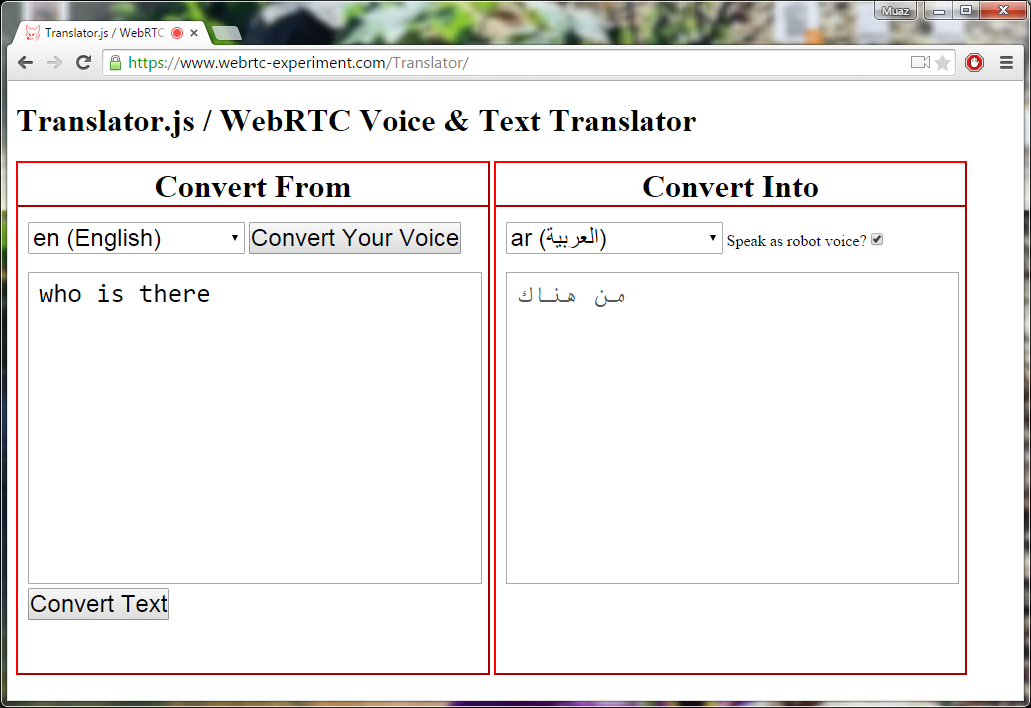
# [Translator.js](https://github.com/muaz-khan/Translator) | WebRTC Voice & Text Translator
# Demo: https://www.webrtc-experiment.com/Translator/
Translator.js is a JavaScript library built top on Google Speech-Recognition & Translation API to transcript and translate voice and text. It supports many locales and brings globalization in WebRTC!
# How to use?
```html
```
# Facing issues using in your own domain?
* https://github.com/muaz-khan/Translator/issues/1#issuecomment-131100677
# API Reference
```javascript
var translator = new Translator();
```
# `getListOfLanguages`
Get list of all supported languages:
```javascript
translator.getListOfLanguages(function(languages) {
languages.forEach(function(language) {
console.log(language.name, langauge.language);
});
});
```
You can pass your API_Key as well:
```javascript
var config = {
api_key: 'AIzaSyCUmCjvKRb-kOYrnoL2xaXb8I-_JJeKpf0',
};
translator.getListOfLanguages(function(languages) {
languages.forEach(function(language) {
console.log(language.name, langauge.language);
});
}, config);
```
# `translateLanguage`
Pass English language text, and convert into Arabic or into any other supported language.
This method simply converts text from one language into another.
```javascript
var config = {
from: 'language-of-the-text',
to: 'convert-into',
api_key: 'AIzaSyCUmCjvKRb-kOYrnoL2xaXb8I-_JJeKpf0', // use your own key
callback: function (translatedText) {
console.log('translated text', translatedText);
// here you can use "speakTextUsingRobot"
// see below sections
}
};
translator.translateLanguage(textToConvert, config);
```
`translateLanguage` method takes two arguments:
1. Text to convert
2. Source and Target Languages; also callback method
Second argument is an object.
What you can do is either display translated text in chat-box; or use `speakTextUsingRobot` or `speakTextUsingGoogleSpeaker` methods to play voice.
# `voiceToText`
This method allows you convert voice into text; whatever you speak is recognized using Google Speech-Recognition API; and converted into text using same API:
```javascript
var convertMyVoiceIntoEnglish = 'en-US'; // select any language
translator.voiceToText(function (text) {
console.log('Your voice as text!', text);
// here you can use "translateLanguage" method
// translator.translateLanguage
// see more info in above section
}, convertMyVoiceIntoEnglish);
```
`voiceToText` method takes two arguments:
1. Callback; used to return recognized text
2. Language; used to suggest Speech-Recognition API to easily recognize speaker's language
If `language` is not passed; then `en-US` will be used as default language.
You can use socket.io, websockets or any other signaling gateway like [WebRTC](https://www.webrtc-experiment.com/) data channels to exchange/share transcripted text with other users.
# `speakTextUsingRobot`
Use a javascript file to speak the text.
This method uses meSpeak.js library to play text using a robot voice. Behind the scene; text is buffered and converted into WAV file; which is played using invisible `